Index / AdsTurbo / Hands-on review
AdsTurbo review (2026)
Hands-on test of URL-to-Video and AI Actors. Two real ads, 446 credits, every number below measured by us.
Tested Oct 21, 2026 · By UGC Ad Tool Index
Fast, cheap ad drafts from a store link. Polish and transparency are still catching up.
If you sell on Amazon, Shopify, TikTok Shop or the app stores, URL-to-Video turned a product link into a usable 15-second product-demo ad in about five minutes, for a few dollars. The AI Actor flow made a believable talking-head UGC clip. The catches: it won't take non-store links, the AI Actor cost isn't shown before you generate, render-time estimates were way off, and you can't download anything until you pay.
Best for: e-commerce and app sellers who want quick, low-cost ad variations. Skip if: you need fine-grained timeline editing or you're advertising a service or a site that isn't a store listing.
Try AdsTurboPros
- Product link to finished ad in about 5 minutes (5m17s for us)
- Four ready-made concepts per product: POV Product Demo, Cinematic Ad, UGC Talking Head, Problem-Solution Demo
- URL-to-Video shows the credit cost on the Generate button
- Six aspect ratios, 720p or 1080p, six voiceover languages
- Around 45–50 AI actors, most with several looks, plus gender and age filters
- AI Actor text-to-speech adds emotion automatically, with an "Add emotions" option
- Low cost per ad (~$2.48–$4.46 on the Starter Pack)
Cons
- URL-to-Video only accepts Amazon, Shopify, TikTok, App Store and Google Play links
- AI Actor cost (176 credits) isn't shown before you generate
- The AI Actor render took 8m48s against a "30–60s" estimate, and sat at 97–99%
- New accounts can't download until a first purchase
- No duration picker in URL-to-Video. 1080p is the default, which is easy to miss
- Re-edit reopens the wizard. There's no timeline editor
- Rough edges: some dropdown clicks picked the wrong value, the credit badge stayed stale until a reload, occasional page hangs (a new tab fixed them), and a persistent upsell banner
Test 1: URL-to-Video
We first tried our own site, ugcadtools.com. It was rejected with "Failed to parse the link". A Quick Ads attempt also failed, and AdsTurbo refunded those credits. URL-to-Video is built for store listings: Amazon, Shopify, TikTok, App Store and Google Play. So we used an Amazon Echo Dot listing.
The flow: Skill → URL to Video → paste the link → Extract product (about 40–60 seconds) → review the product details → set the resolution → pick one of four concepts → Generate.
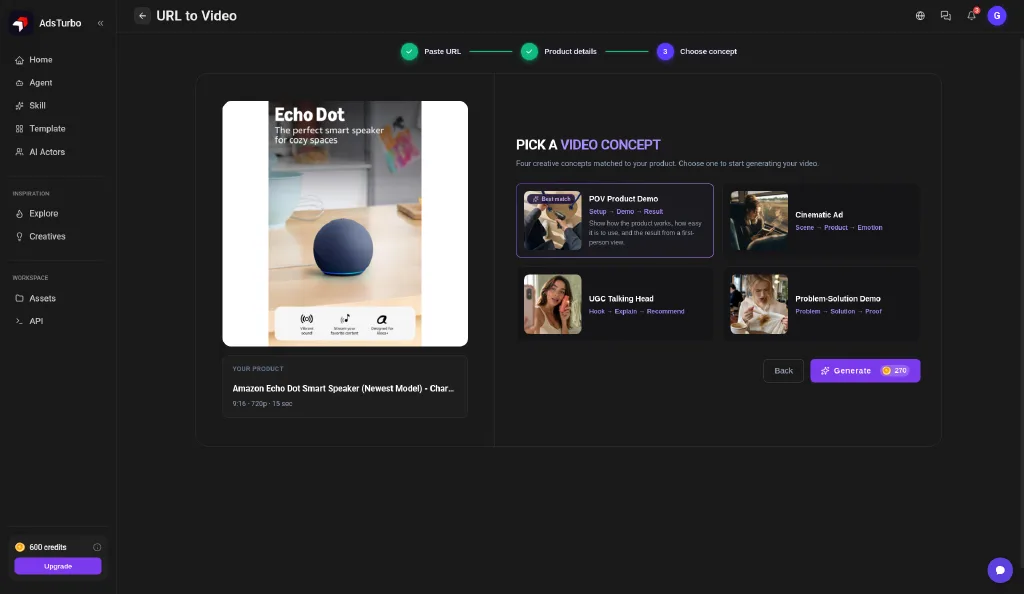
Options: aspect ratios 9:16, 16:9, 4:3, 3:4, 1:1 and 21:9. Resolution is 720p or 1080p, and 1080p is the default, so switch it if you want the cheaper render. Voiceover comes in English, Chinese, Spanish, French, German and Japanese. There's no duration picker; ours came out at 15 seconds.
We picked POV Product Demo at 9:16 and 720p. It cost 270 credits and took 5m17s. The ad shows a finger pressing the Echo Dot while its light ring changes colour. It's a clean, believable product-demo shot.

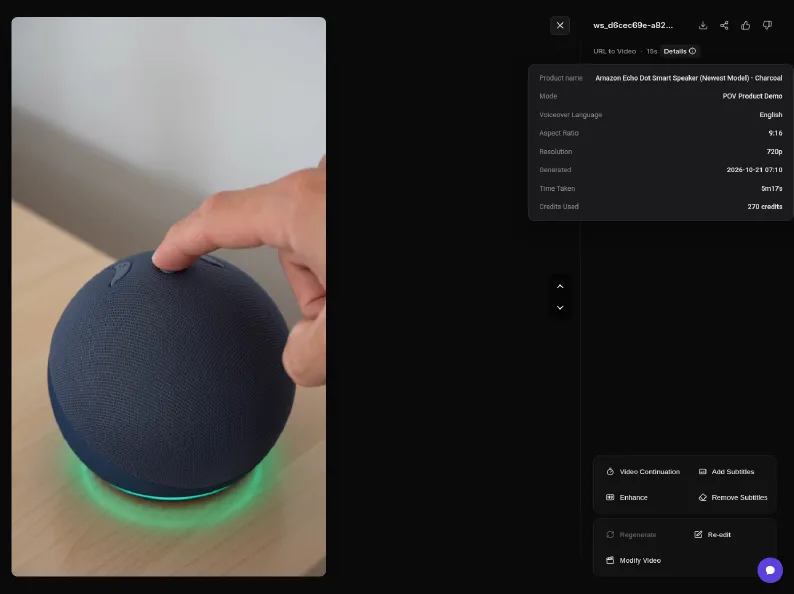
After generation you can use Video Continuation, Add/Remove Subtitles, Enhance, Re-edit or Modify Video. Re-edit sends you back through the wizard. It isn't a timeline editor.
Test 2: AI Actor UGC video
AI Actors lives in the sidebar. There are around 45–50 default actors, each with 1 to 7+ looks, and you can filter by gender and age. Picking one takes two clicks: the actor card, then a look. Then you type a script (up to 1,500 characters). Text-to-speech adds emotion automatically, and there's an "Add emotions" option. We didn't see an aspect-ratio or language picker. The ratio follows the look you choose.
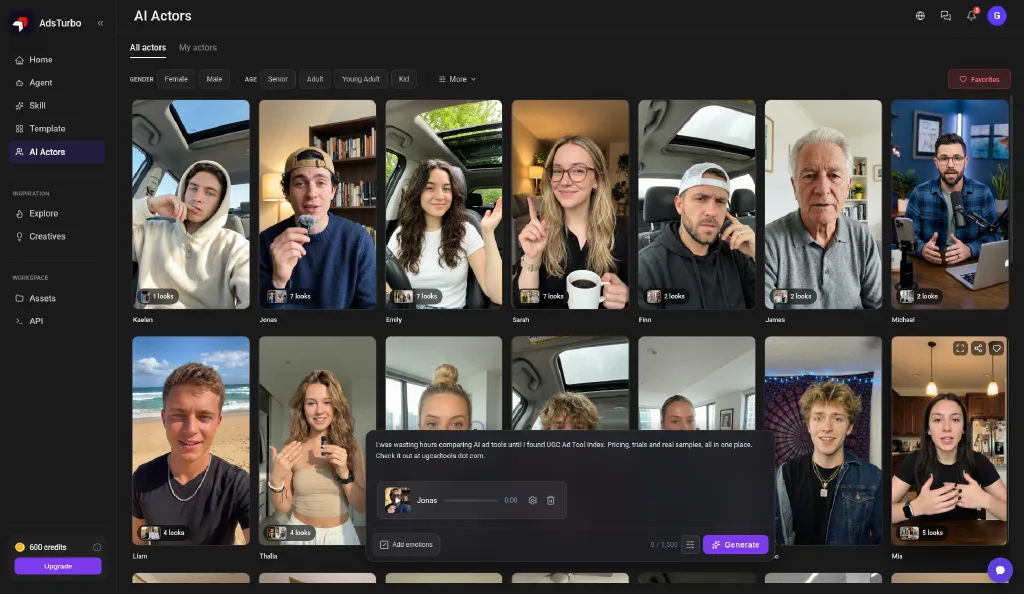
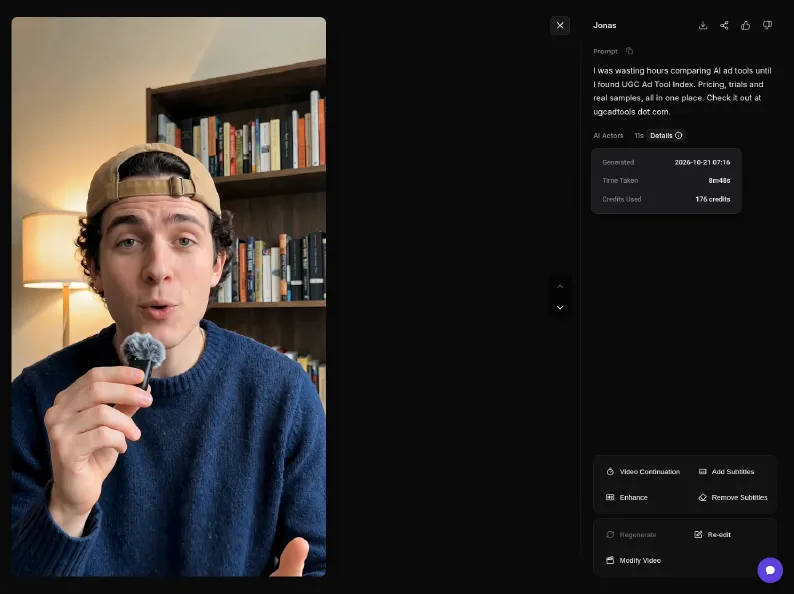
Our 162-character script made an 11-second, 9:16, English video. Length follows the script. It cost 176 credits, which wasn't shown until after it finished. The overlay said to expect 30–60 seconds. The full render took 8m48s, and progress stalled at 97–99% along the way.
What it cost
| Item | Output | Credits | Cost shown before generating? | Render time |
|---|---|---|---|---|
| URL-to-Video (POV Product Demo) | 15s · 9:16 · 720p | 270 | Yes, on the button | 5m17s |
| AI Actor UGC video | 11s · 9:16 | 176 | No | 8m48s |
| Failed Quick Ads attempt (non-store URL) | None | 0 (refunded) | — | — |
| Total | 2 ads | 446 of 600 (154 left) |
Pricing per AdsTurbo's founder: $9.90 Starter Pack, which works out to ~$4.46 per 15s 720p URL-to-Video ad and ~$2.48 per 15s UGC video. During the test the app also showed a "$8.9 = 600 credits, 70% OFF" banner the whole time. Remember you'll need a purchase before you can download anything. Full AdsTurbo pricing file →
FAQ
How much does an AdsTurbo video cost?
In our test, a 15-second 720p URL-to-Video ad cost 270 credits and an 11-second AI Actor UGC video cost 176 credits. Per AdsTurbo's founder, on the $9.90 Starter Pack that works out to roughly $4.46 per 15s 720p URL-to-Video ad and about $2.48 per 15s UGC video.
Can AdsTurbo make a video from any website URL?
No. URL-to-Video supports Amazon, Shopify, TikTok, App Store and Google Play links. Our own non-store site was rejected with "Failed to parse the link". Credits from a failed Quick Ads attempt were refunded.
How long does AdsTurbo take to generate a video?
Our URL-to-Video ad took 5m17s. Our AI Actor video took 8m48s, even though the on-screen overlay said 30–60 seconds; progress sat at 97–99% for a while.
Can I download videos on the free credits?
Not on our new account. The download button did nothing until a first purchase is made.
Can I choose the video length?
Not in URL-to-Video: there was no duration picker and the ad came out at 15 seconds. For AI Actors, length follows the script (a 162-character script made an 11-second video; scripts max out at 1,500 characters).
What aspect ratios and languages does AdsTurbo support?
URL-to-Video offered 9:16, 16:9, 4:3, 3:4, 1:1 and 21:9 at 720p or 1080p, with voiceover in English, Chinese, Spanish, French, German and Japanese. The AI Actor flow showed no ratio or language picker; the ratio follows the actor look you choose.
Still comparing? Take the tool finder quiz · Best for TikTok Shop · Best under $50/mo · Price tracker